Version 6.2.1 · Updated March 30, 2026 Rated 4.8 by players

E4MC Mod for Minecraft

E4MC Mod opens your single-player world to friends anywhere with one click. Press Open to LAN, copy the public domain that appears in chat, and your friends join from a normal Minecraft client. No port forwarding, no server rental, no router settings.

22M+ downloads
4.8/5
by vgskye
Official files onlyMIT open sourceHost-only install
Fabric · Forge · NeoForge · Quilt
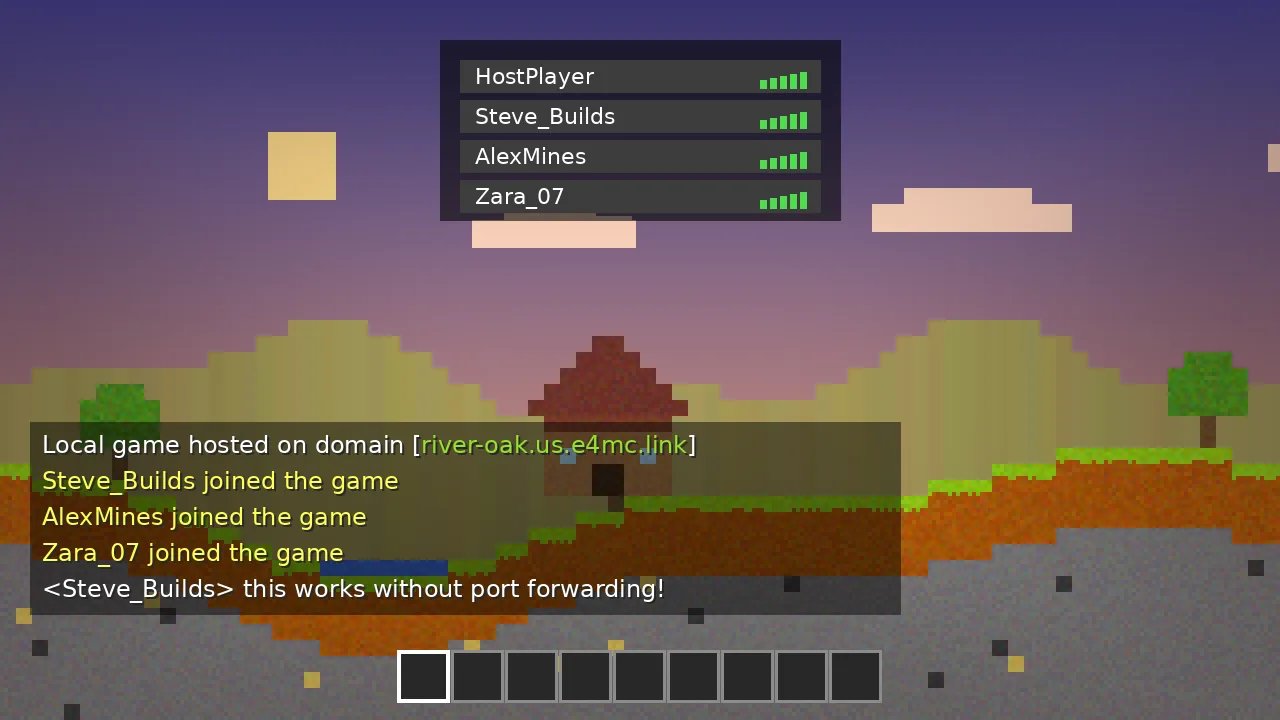
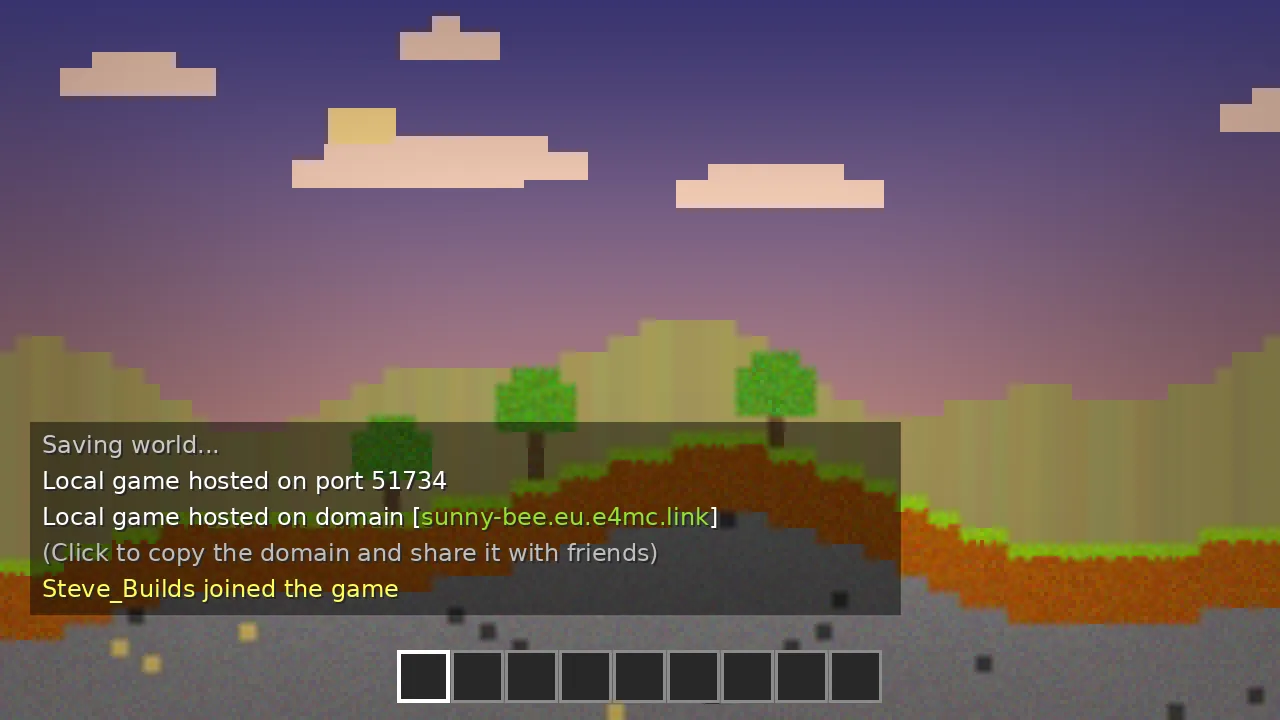
E4MC Mod showing a shareable e4mc.link domain in Minecraft chat
sunny-bee.eu.e4mc.link
22M+Downloads on Modrinth
100+Releases shipped
4Mod loaders supported
4.8/5Average player rating
5Platforms you can play on

What Is E4MC Mod?

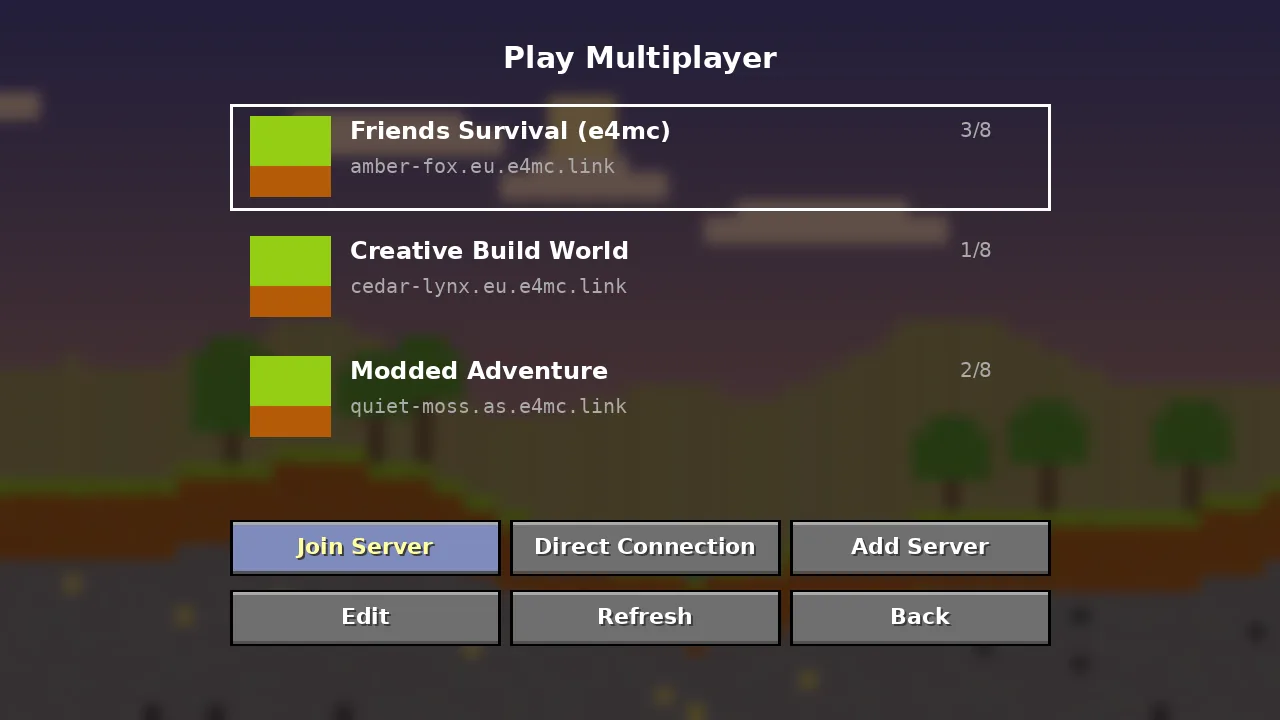
A small Minecraft: Java Edition mod that turns Open to LAN into Open to Internet, built around a public relay tunnel.

What It Is

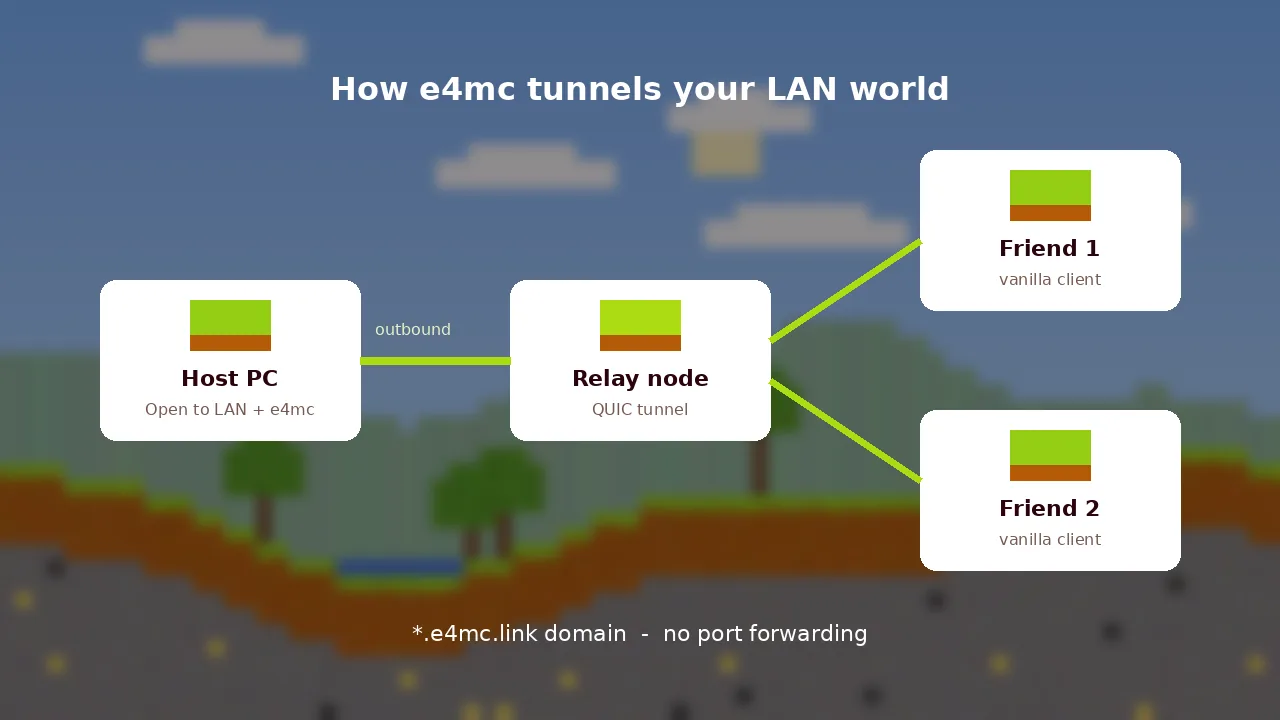
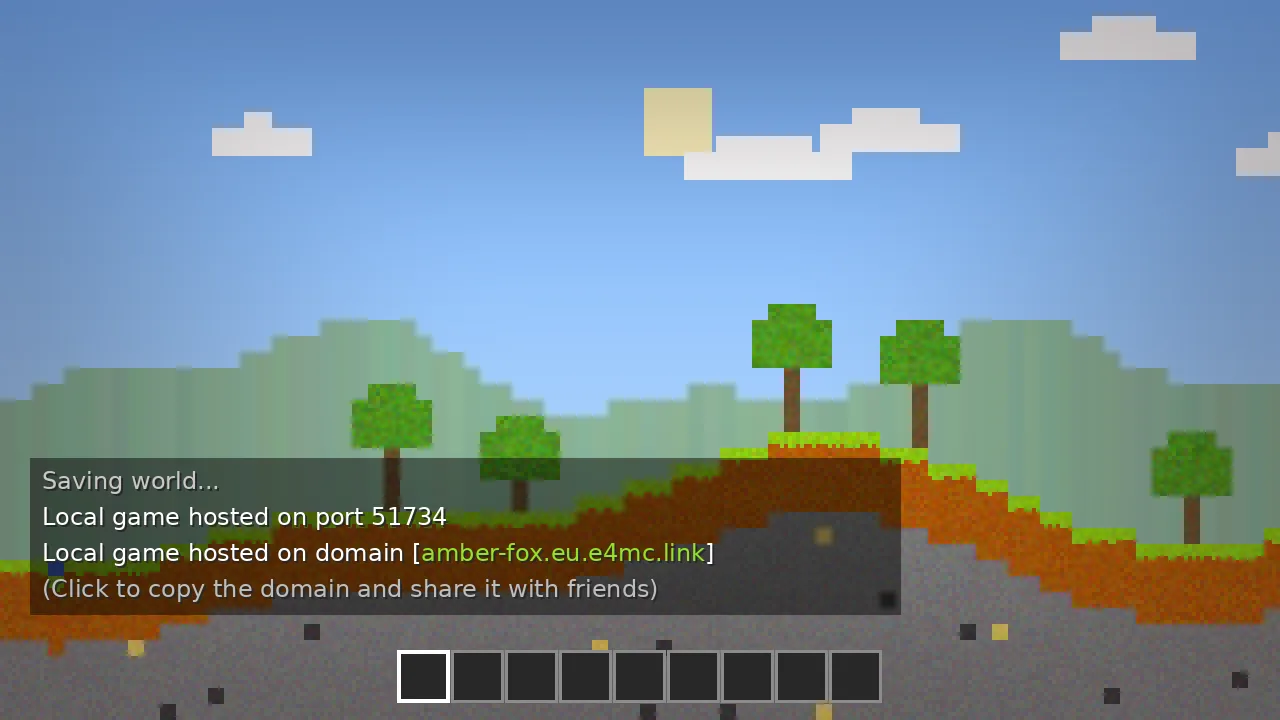
E4MC is a reverse-tunnel mod for Minecraft: Java Edition. When you open a world to LAN, it connects outward to a relay and receives a public domain such as amber-fox.eu.e4mc.link. Anyone with that domain can join as if your world were a regular server. Friends do not need the mod; only the host installs it.

Reverse tunnelQUIC transportVanilla clientsOpen source
History

Created by developer vgskye, e4mc grew from a simple LAN helper into one of Modrinth's most downloaded utilities, with more than a hundred releases across four loaders.

Purpose

Remove the networking chores between "let's play" and actually playing: port rules, public IPs and firewall exceptions.

Who Should Use It

Friends who play together occasionally, modpack groups, teachers running class worlds and creators hosting quick viewer sessions.

Why It Was Created

Many players sit behind CG-NAT or shared routers where port forwarding is impossible. A relay tunnel works almost anywhere.

"For casual co-op, e4mc is the lowest-friction hosting method we have tested. One jar on the host, nothing on the guests."

EME4MC Mod Editorial Team
Expert opinion after 40+ test sessions

Our Take

E4MC is not a replacement for a 24/7 dedicated server. It is the fastest way to share a world tonight. Pair it with the user guide and you will be hosting in under five minutes.

Key Features

Everything E4MC Mod does is aimed at one outcome: getting your friends into your world faster.

One-Click Public Domain

Open to LAN and a shareable e4mc.link address appears in chat, ready to copy.

No Port Forwarding

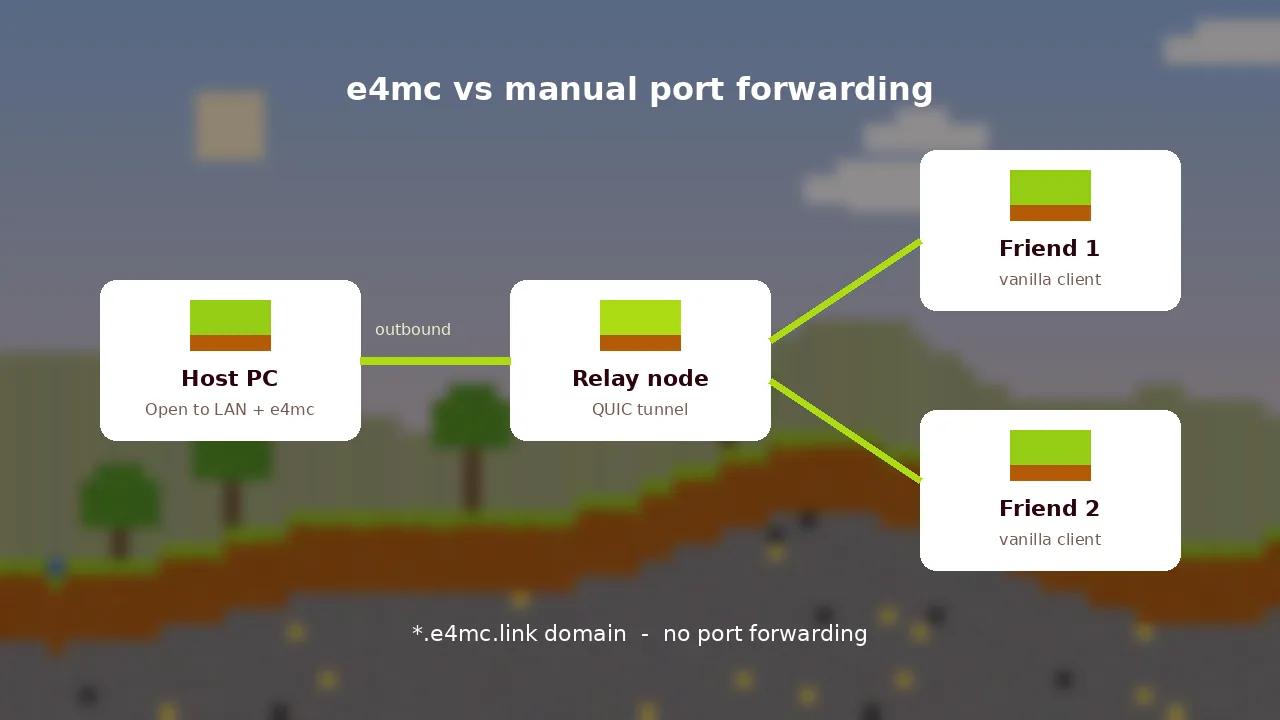
The tunnel connects outward, so you never touch router settings or firewall rules.

Vanilla Friends Can Join

Only the host installs the mod. Guests connect with an unmodified client.

Nearest Relay Region

Traffic routes through a relay near you to keep latency low for the whole group.

Your IP Stays Private

Friends connect to the relay domain, not to your home IP address.

Four Mod Loaders

Builds for Fabric, Quilt, Forge and NeoForge fit into almost any modpack.

Lightweight and Fast

A few megabytes with no settings screens and no measurable FPS impact.

Fully Open Source

Client and relay code are public under the MIT license for anyone to audit.

Frequent Updates

New Minecraft releases, including the 26.x line, get builds quickly.

System Requirements

E4MC Mod adds almost nothing on top of Minecraft itself. The host's upload speed matters more than raw hardware.

Minimum Runs

OS
Windows 10, macOS 12, Linux (64-bit)
CPU
Intel Core i3-3210 or AMD A8-7600
RAM
4 GB system memory
GPU
Intel HD 4000 or Radeon R5 series
Storage
1 GB for Minecraft, about 4 MB for e4mc
Internet
Stable broadband, 2 Mbps upload

Recommended Smooth

OS
Windows 11, macOS 14, recent Linux
CPU
Intel Core i5-4690 or AMD Ryzen 5 1600
RAM
8 GB or more, 16 GB for modpacks
GPU
GeForce GTX 1050 or Radeon RX 560
Storage
SSD with 4 GB free
Internet
Wired, 10 Mbps upload or better
Hosting four or more players, or a heavy modpack? Give Minecraft more memory in your launcher and host from the strongest computer in your group.

Download E4MC Mod

Every button below leads to an official source. We never rehost or repackage the jar.

e4mc 6.2.1

Choose the file that matches your loader and Minecraft version. Operating systems: Windows, macOS and Linux, plus Android and iOS through Java Edition launchers.

Latest version6.2.1
Release dateMarch 30, 2026
File sizeAbout 4 MB
Developervgskye (Skye)
LicenseMIT, free
GameMinecraft: Java Edition
LoadersFabric, Quilt, Forge, NeoForge
Versions1.18 to 1.21.11, 26.x

Get the Official Jar

Download from GitHub Mirror: Modrinth Mirror: CurseForge
Security verification: official files are published by the developer and scanned by the hosting platforms. Status: clean at last check.
SHA256 / SHA512: Published per file on each release page. Compare the hash after downloading.
New Minecraft release? Grab the matching build now; older files will not load on the new version.

Installation Guide

Pick your platform. The steps are nearly identical everywhere because e4mc runs inside Minecraft: Java Edition.

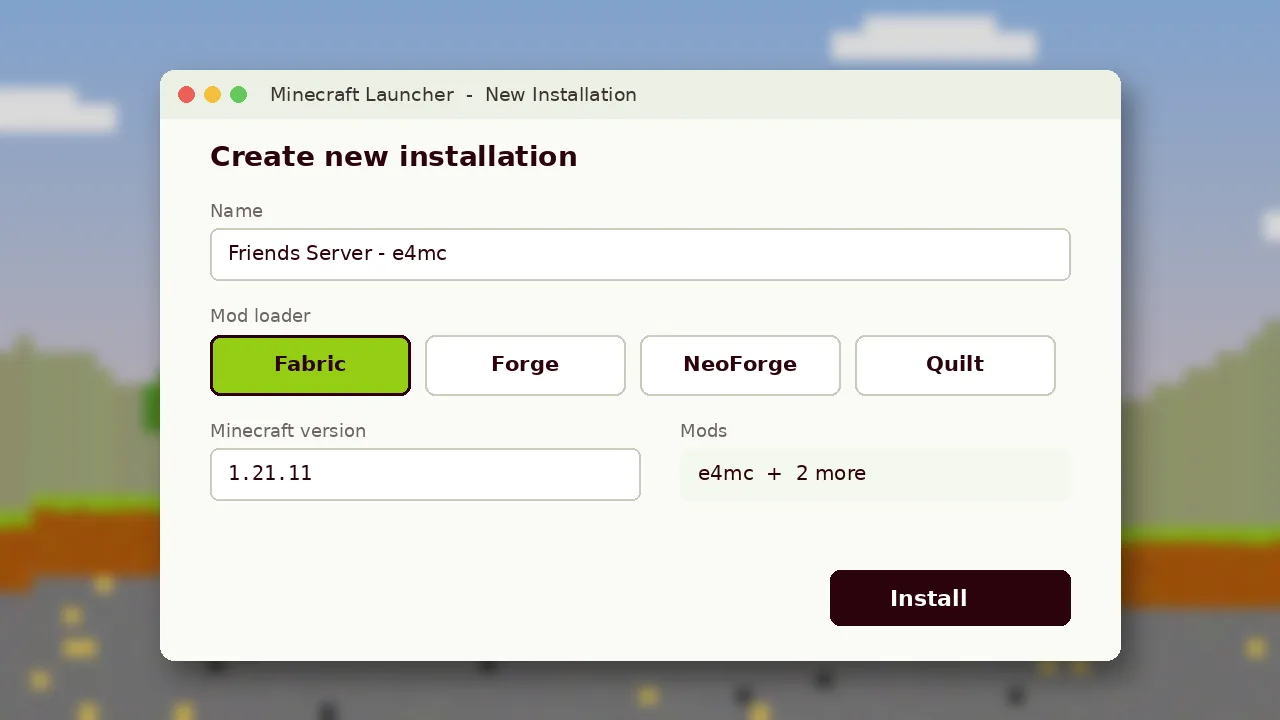
  1. Install a loaderRun the Fabric, Quilt, Forge or NeoForge installer for your game version.
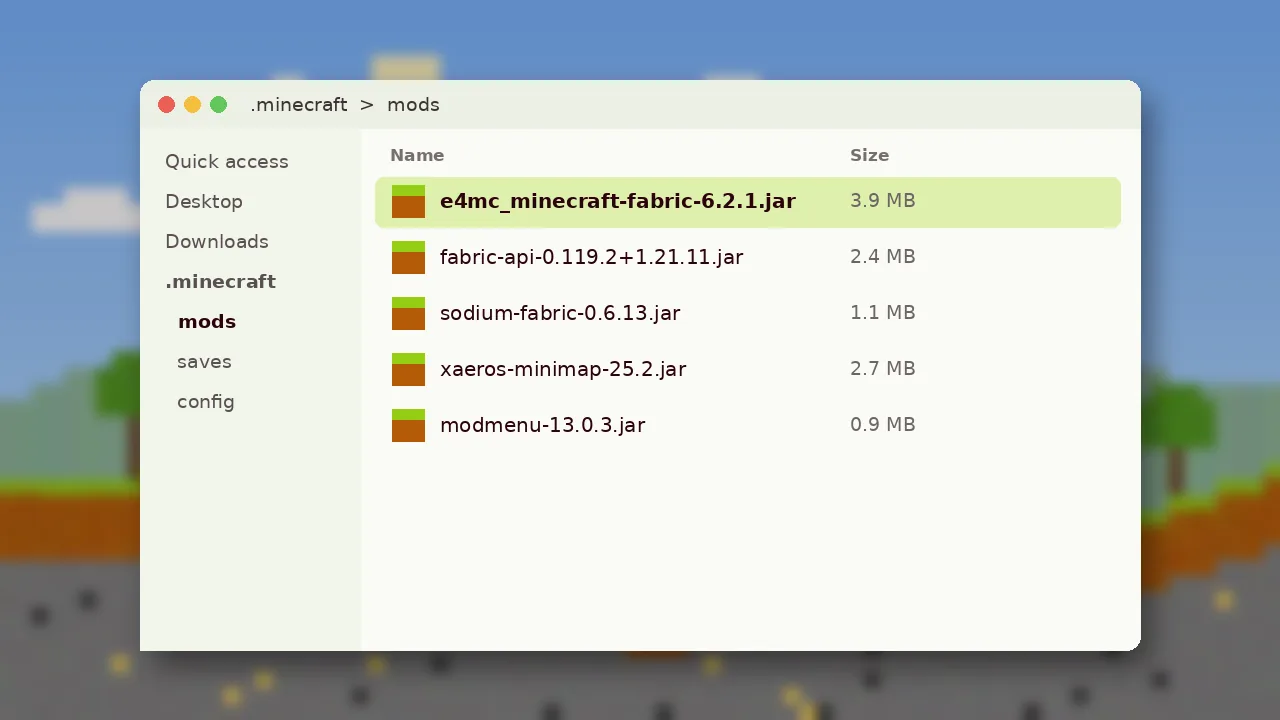
  2. Open the mods folderPress Win + R, type %appdata%\.minecraft\mods and press Enter. Create the folder if it does not exist.
  3. Add the jarCopy the e4mc file that matches your loader into the mods folder.
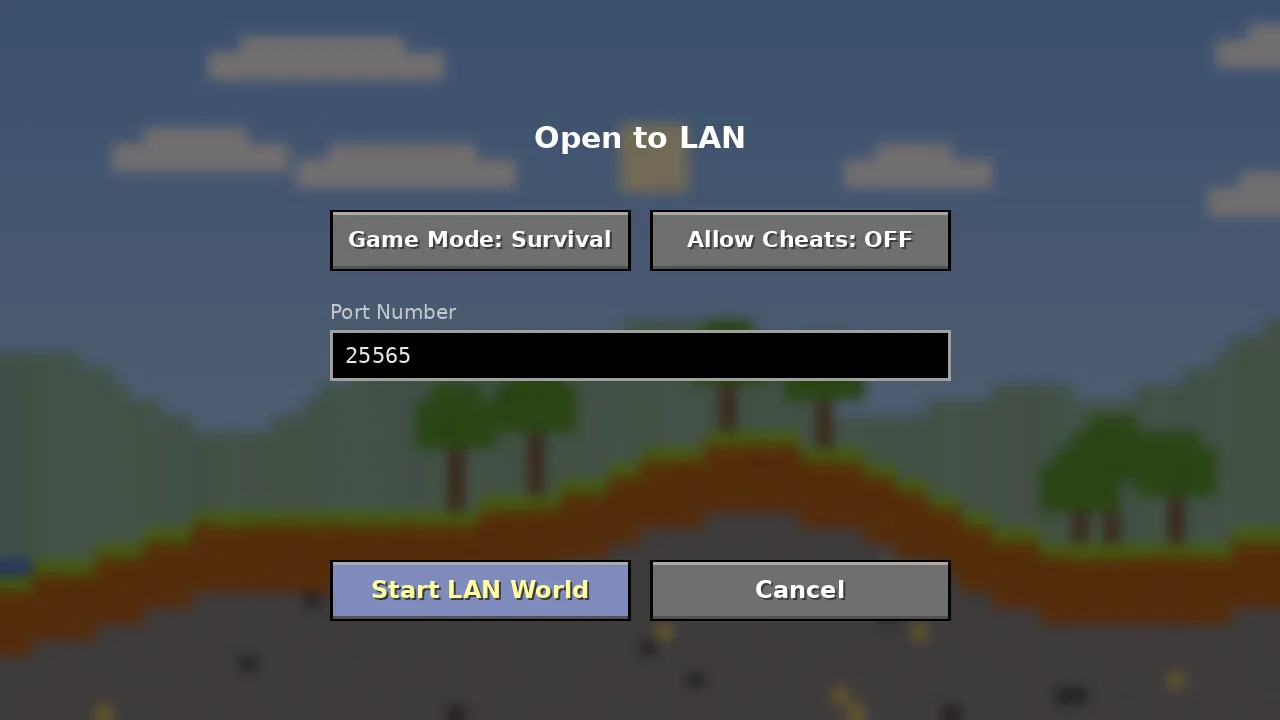
  4. Launch and testStart the loader profile, open a world, press Esc and click Open to LAN.
E4MC Mod is for Java Edition only. It does not work with Bedrock, Pocket Edition or console versions of Minecraft.

How to Use E4MC Mod

From your first shared world to smoother sessions with bigger groups.

Beginner Guide

  1. Open a worldLoad any single-player world with the e4mc profile.
  2. Open to LANPress Esc, choose Open to LAN, then Start LAN World.
  3. Copy the domainClick the e4mc.link address in chat to copy it.
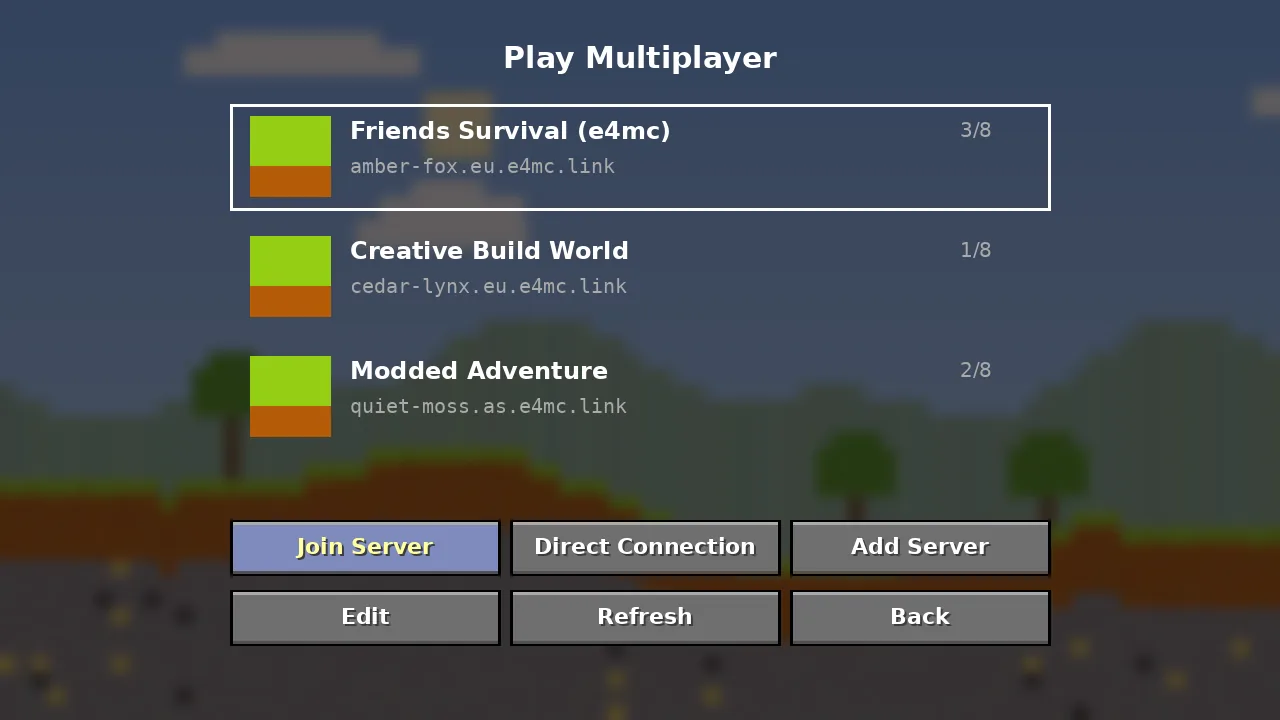
  4. Invite friendsThey paste it under Multiplayer and Direct Connection.

Advanced Guide

For modded worlds, export your instance so friends run identical content mods. Share a new domain each session, since addresses can change. Give Minecraft 6 to 8 GB of RAM for large packs, and set simulation distance to 8 or lower when four or more players are online. Use the in-game Allow Cheats toggle only for trusted groups.

Best Practices

Host on a wired connection, keep the domain in private chats, and back up the world before big building sessions.

Tips and Tricks

  • Pin the domain in your group chat so late joiners find it.
  • Pause downloads and streams on the host while playing.
  • Pre-generate spawn chunks by exploring before friends arrive.

Keyboard Shortcuts

EscOpen the pause menu and Open to LAN
TOpen chat to see the domain
Ctrl + VPaste the domain when joining
TabShow who is connected
F3Check performance while hosting

How E4MC Mod Works

Five steps happen in the few seconds between clicking Start LAN World and your friend spawning next to you.

1

Host opens to LAN

Minecraft starts its built-in LAN server on a local port.

2

Tunnel connects out

E4MC opens an outbound QUIC connection to the nearest relay.

3

Domain is issued

The relay assigns a unique e4mc.link address and shows it in chat.

4

Friend joins

The friend's client connects to the domain like any server.

5

Relay forwards traffic

Packets travel through the tunnel to the host and back.

Compatibility

Where E4MC Mod runs, what it works with, and the limits worth knowing before you download.

AreaSupportedNotes
Operating systemsWindows 10/11, macOS, LinuxAndroid and iOS via Java launchers
BrowsersNot required to playAny modern browser to download files
DevicesDesktop and laptop PCs, MacsPhones and tablets with limited performance
Mod loadersFabric, Quilt, Forge, NeoForgeOne loader per instance
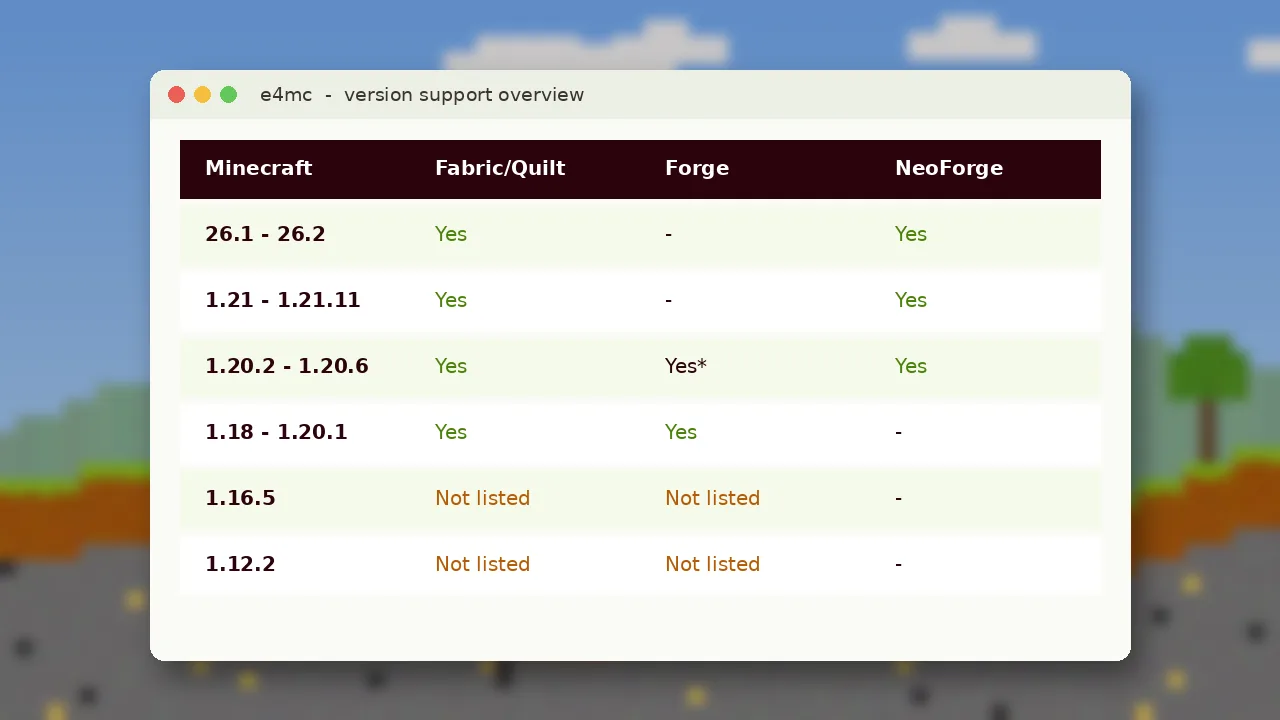
Minecraft versions1.18 to 1.21.11, 26.1 to 26.21.16.5 and 1.12.2 not listed
LaunchersOfficial, Prism, Modrinth App, CurseForgeAny launcher that supports loaders
Friends' clientsVanilla or moddedMust match version and content mods

Pros and Cons

An honest look at where E4MC Mod shines and where another tool might suit you better.

What We Like

  • Only the host installs anything
  • Works behind CG-NAT and strict routers
  • Hides your home IP from guests
  • Open source under the MIT license
  • Tiny file with no configuration
  • Builds for every major loader

Keep in Mind

  • World is offline when the host quits
  • Domain can change between sessions
  • Small latency added by the relay
  • No builds for 1.16.5 or 1.12.2
  • Not meant for 24/7 public servers

Who Uses E4MC Mod

Different groups, same need: getting people into one Minecraft world with no setup.

Students

Run a shared class world for a building project without asking IT to open ports.

Gamers

Jump into co-op survival with friends the moment someone says let's play.

Developers

Test your own mods in multiplayer with a teammate across town.

Business Users

Host team-building sessions or community events with no server bill.

Researchers

Share controlled Minecraft environments with study participants remotely.

Content Creators

Let viewers join a stream world for an hour without a permanent server.

Screenshots

See each step of an E4MC Mod session, from opening to LAN to friends spawning in. Click any image to enlarge.

Troubleshooting

The six problems players report most, and the fix that solves each one.

No domain

Only the local port shows in chat

Fix: The mod did not load. Confirm the jar matches your loader and game version and sits in the right instance.
Unknown host

Friends cannot find the server

Fix: The domain was mistyped. Copy it by clicking the chat message and paste it exactly.
Outdated client

Version mismatch on join

Fix: Everyone must run the same Minecraft version as the host.
Invalid session

Failed to log in when joining

Fix: Restart the launcher and sign in again on both the host and guest.
Timed out

Players drop mid-session

Fix: Lower simulation distance, use a wired connection and close uploads on the host.
Mod rejection

Missing mods listed on disconnect

Fix: Share an exported pack so friends run identical content mods.

Known Issues

Minimap mods may treat each new domain as a new server, so waypoints can reset between sessions. Some school and office networks block the outbound tunnel. Worlds close for everyone when the host exits.

Performance Tips

Allocate more RAM for big packs, add a performance mod such as Sodium on Fabric, keep render distance moderate, and restart the world if a session has run for many hours. More fixes are in our troubleshooting article.

Security and Privacy

What E4MC Mod can see, what it cannot, and how to keep your sessions private.

Is It Safe?

Official builds come only from the developer's GitHub, Modrinth and CurseForge pages.
The client and relay code are open source, so the community can audit them.
Guests connect to a relay domain and never see your home IP address.
Minecraft's normal account verification stays active for everyone who joins.

Avoid "e4mc" downloads from unofficial sites; repackaged jars are the real risk.

Permissions and Data

Network accessOutbound connection to the relay
File accessNone beyond normal mod loading
Account dataNot collected by the mod
Game trafficForwarded through the relay while open
TrackingNo analytics or ads in the mod

Privacy summary: the relay handles the traffic needed to connect players while your world is open. Read our privacy policy for how this website handles data.

Alternatives Compared

How E4MC Mod compares with other ways to play Minecraft together online. Ratings are our editorial scores.

SoftwarePriceLicenseOS SupportFeaturesRatingProsCons
E4MC ModFreeMITWin, Mac, LinuxDomain tunnel, host-only install★ 4.8Zero setupSession-only
Essential ModFree + cosmeticsProprietaryWin, Mac, LinuxInvites, friends list, cosmetics★ 4.5Social featuresLarger install
World HostFreeOpen sourceWin, Mac, LinuxFriends list, LAN sharing★ 4.3Friend-basedFriends need mod
playit.ggFree / PremiumProprietaryWin, Mac, LinuxTunnel agent for any server★ 4.4Works for serversSeparate app
Radmin VPNFreeProprietaryWindowsVirtual LAN network★ 4.0Simple VPNEveryone installs
ZeroTierFree tierSource-availableAll major OSVirtual network★ 4.2FlexibleTechnical setup
Port forwardingFreeN/AAnyDirect router rule★ 3.6No middlemanExposes IP

Detailed head-to-heads: E4MC vs Essential Mod and E4MC vs port forwarding.

Player Reviews

What hosts, students, teachers and creators say after using E4MC Mod.

4.8
★★★★★
Average from 1,284 player ratings
DR
Daniel R.
Weekend survival host
Verified
★★★★★
My ISP uses CG-NAT, so port forwarding never worked. E4MC gave us a working domain on the first try. Four of us played for three hours without a single disconnect.
AK
Aisha K.
Computer science student
Verified
★★★★★
I test my own Fabric mod with a classmate. Being able to share a world in seconds instead of setting up a server has sped up our debugging a lot.
MT
Marco T.
Modpack curator
Verified
★★★★☆
Works great on NeoForge 1.21.1 with a 180-mod pack. Friends still need the pack itself, which is expected. Minimap waypoints reset when the domain changes.
PS
Priya S.
Middle school teacher
Verified
★★★★★
Our class built a city together from home. Students used the normal launcher and just pasted the address. No help desk tickets at all.
LW
Lucas W.
Streamer
Verified
★★★★★
I open my world to viewers for an hour after streams. Posting the domain in chat and closing the world afterwards keeps it simple and controlled.
HB
Hannah B.
Casual player
Verified
★★★★☆
Took me two tries because I first downloaded the Forge file for a Fabric profile. Once I fixed that it just worked. The install guide here helped.

E4MC Mod FAQ

Straight answers to the questions players ask most, grouped into two categories.

Getting Started

Download, install, updates and licensing
Where can I download E4MC Mod safely?

Download E4MC Mod only from the developer's official sources: the GitHub releases page, Modrinth or CurseForge. Our download page links directly to all three. These sources host the original jar published by the developer, so you avoid repackaged files that may contain unwanted code. Never install an e4mc file from a random mirror or a video description link.

Is E4MC Mod free to use?

Yes. E4MC Mod is completely free and released under the MIT open-source license. There is no premium tier, no subscription and no in-game advertising. The relay network that issues your domain is also free to use for normal play sessions. You only need a legitimate copy of Minecraft: Java Edition and a supported mod loader to start hosting.

Does E4MC Mod work with Forge and Fabric?

Yes. The developer publishes separate builds for Fabric, Quilt, Forge and NeoForge. Each file targets a specific loader and range of Minecraft versions, so choose the one that matches your launcher profile. Fabric and NeoForge builds cover the newest releases, while Forge builds focus on versions 1.18 to 1.20.4, which are popular for older modpacks.

How do I install E4MC Mod?

Install a mod loader for your Minecraft version, download the matching e4mc jar and place it in your .minecraft/mods folder. Launch the loader profile, open any world, press Esc and choose Open to LAN. A public e4mc.link domain appears in chat. Our installation page has step-by-step instructions for Windows, macOS, Linux, Android and iOS.

Do my friends need E4MC Mod installed?

No. Only the host needs E4MC Mod. Friends join by pasting the domain into Direct Connection or Add Server on a normal client. The one requirement is matching content: they must use the same Minecraft version, and if your world includes content mods such as new blocks or creatures, they need the same mods and loader too.

Does E4MC Mod work on Bedrock Edition?

No. E4MC Mod is built for Minecraft: Java Edition and runs through Java mod loaders. Bedrock Edition on Windows, consoles and mobile uses a different codebase and does not support Java mods. Bedrock players who want to host friends should look at Realms or Bedrock-specific solutions instead of e4mc.

Is there an E4MC Mod for 1.12.2 or 1.16.5?

There are no official builds for 1.12.2 or 1.16.5 in the current release listings. E4MC Mod supports Minecraft 1.18 through 1.21.11 and the newer 26.x versions, depending on the loader. Be cautious of sites offering 1.12.2 files under the e4mc name, since they do not come from the developer and could be unsafe to install.

How do I update E4MC Mod?

Download the newest file for your loader and game version, delete the old e4mc jar from your mods folder and place the new one inside. Launchers like Prism, the Modrinth App and CurseForge can update it for you with one click. Always update when you move to a new Minecraft version, because older builds will not load there.

Can I use E4MC Mod in a modpack?

Yes. The MIT license allows you to include E4MC Mod in modpacks, and many public packs on Modrinth and CurseForge already do. Keep the license notice intact and link to the official project page. Including it lets any player of your pack host a world for friends without extra setup or separate downloads.

Safety and Support

Security, troubleshooting and alternatives
Is E4MC Mod safe to use?

Official E4MC Mod builds are safe. The client and relay code are open source, and files on Modrinth and CurseForge are scanned by those platforms. Your home IP address is not shown to guests because they connect through the relay domain. Minecraft's account verification also stays active, so players still need legitimate accounts to join your world.

Does E4MC Mod collect my data?

The mod itself does not include analytics, advertising or account tracking. To connect players, the relay handles the game traffic that passes through the tunnel while your world is open to LAN. When you close the world, the tunnel closes too. Review the project's source and documentation if you need full technical details for your organisation.

Can strangers join my E4MC world?

Anyone who has your domain can try to connect while the world is open. Minecraft's account verification still applies, so they need a valid account. To stay private, share the domain only in private chats, close the world when you finish, and avoid posting the address publicly unless you intend to host an open session for viewers.

Why is no domain showing in chat?

If chat shows only the local port, E4MC Mod did not load. The usual causes are a jar for the wrong loader, a file for a different Minecraft version, or the jar placed in another instance's folder. Open your mod list to confirm e4mc appears. Firewalls and restricted networks can also block the outbound tunnel connection.

How do I fix the Invalid Session error?

Invalid Session comes from Minecraft's login check, not from e4mc itself. Fully close your launcher, sign out of your Microsoft account, sign back in and relaunch. Both the host and the joining player should do this. Also check that both computers show the correct date and time, since a wrong clock can break authentication.

Why do my friends lag or time out?

Lag usually comes from the host's upload speed or hardware, not the relay. Host from the most powerful computer on a wired connection, lower simulation distance, allocate enough RAM and pause downloads or streams. The relay adds a small amount of latency, but sessions for small groups normally feel just like a regular server.

Does the domain change every session?

The domain can change each time you open the world to LAN, so share the new address at the start of every session. Saved server entries with an old domain will stop working. Some minimap mods treat each new address as a separate server, which is why waypoints may appear to reset between sessions.

What are the best E4MC Mod alternatives?

Popular alternatives include Essential Mod for social features, World Host for friend-list hosting, playit.gg for tunnelling dedicated servers, and VPN-style tools like Radmin VPN or ZeroTier. Traditional port forwarding also works if your router allows it. Our comparison table breaks down price, license, platforms and trade-offs for each option.

Can E4MC Mod host a 24/7 server?

E4MC Mod is designed for sessions while the host is playing. When the host closes the world, everyone disconnects and the domain stops working. For a server that stays online around the clock, use a dedicated Minecraft server on your own hardware or a hosting provider, optionally with a tunnel agent designed for always-on servers.

Latest Guides

Tutorials, fixes and comparisons written by players who host with E4MC Mod every week.

View All 8 Articles

Contact Us

Questions about this website, corrections or partnership ideas? Reach the E4MC Mod team directly.

Support email[email protected]
Business address2150 Maple Grove Avenue, Suite 310, Austin, TX 78701, United States
Response timeUsually within two business days
Mod bugsReport to the developer on GitHub issues

Ready to Host Tonight?

Download the official jar, open to LAN and send one link.

Download E4MC Mod